

Download StopUpdates10 – Windows 10 Update Manager, System Control, Utility Tool
Overview
StopUpdates10 is a utility tool designed to help Windows 10 users gain control over their system’s automatic update process. The app addresses a common frustration among desktop users: the disruptive nature of mandatory Windows updates that can interrupt workflows, cause system instability, and lead to driver compatibility issues. By allowing users to pause or disable automatic updates with minimal effort, StopUpdates10 offers a practical solution for maintaining system performance and workflow continuity.
The target audience includes both casual users and professionals who rely on stable, uninterrupted computing environments. This includes remote workers, content creators, developers, and anyone using Windows 10 for critical tasks where update interruptions could lead to lost productivity or data. The app is particularly useful for users who prefer to manage updates manually, ensuring compatibility with existing software and hardware before applying changes.
While the developer, StopUpdates10, has not provided additional background details, the app’s purpose is clearly defined: to offer a simple, reliable method to control Windows 10 update behavior. In the broader software ecosystem, such tools fill a niche for users seeking autonomy over system maintenance. With the growing complexity of operating system updates, tools like StopUpdates10 serve as essential utilities for maintaining control and minimizing technical disruptions.
Key Features & Functionality
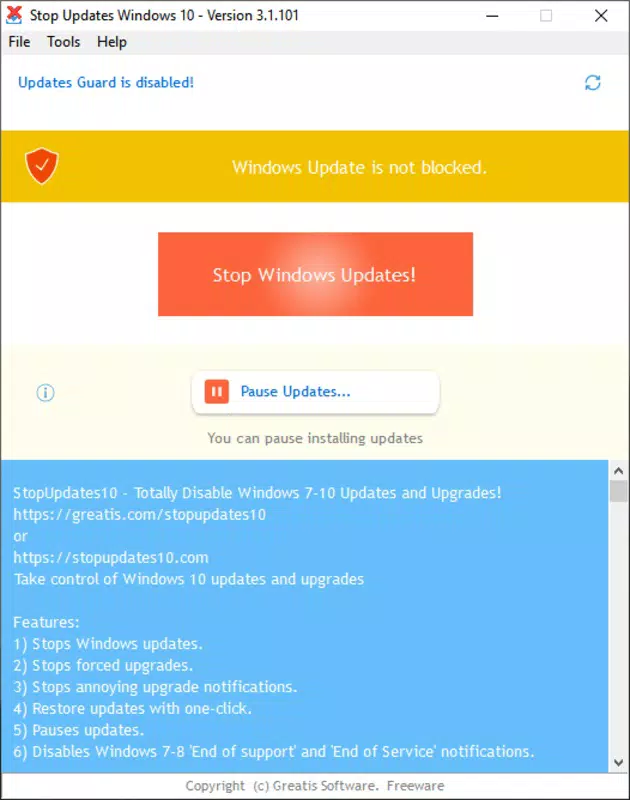
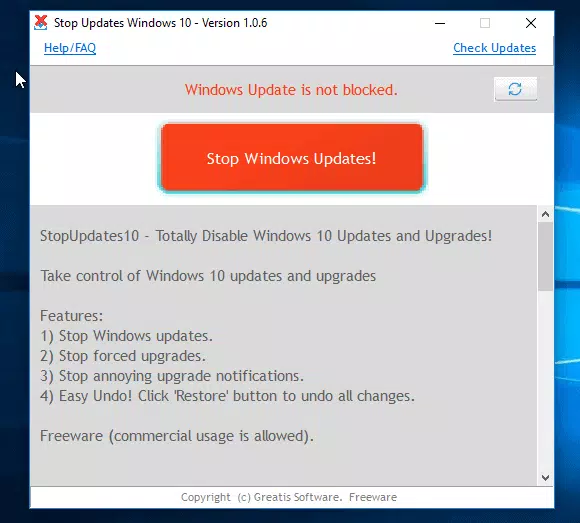
- One-Click Update Stop: A single button activates the feature to disable automatic updates indefinitely, giving users full control over when to update their system.
- Temporary Pause Option: Users can choose to pause updates for a specific duration, allowing temporary relief from update interruptions without permanent changes.
- Reactivation Support: The tool allows users to re-enable automatic updates at any time, ensuring flexibility and long-term usability.
- Simple Interface: Designed for immediate usability, the interface requires no technical knowledge, making it accessible to non-expert users.
- Minimal System Impact: With a file size of just 1.2 MB, StopUpdates10 operates efficiently without consuming significant system resources.
For example, a graphic designer working on a tight deadline can use StopUpdates10 to prevent an update from interrupting a rendering process. Similarly, a developer testing software on a specific Windows configuration can pause updates to avoid unexpected system changes. The ability to reverse actions ensures users are never locked into a state they no longer want. These features collectively support a user-centered approach to system management, prioritizing control, stability, and workflow integrity.
Interface, UX & Performance
StopUpdates10 features a clean, minimalistic interface that prioritizes clarity and ease of use. The layout is straightforward, with clearly labeled buttons and no unnecessary visual clutter. Navigation is intuitive—users can access core functions with a single click, reducing cognitive load and minimizing the risk of accidental actions.
Although the developer did not list formal performance metrics, the app’s lightweight design (1.2 MB) suggests efficient operation with low memory and CPU usage. It is expected to function smoothly on a wide range of Windows 10 devices, from older machines to modern systems. Responsiveness is consistent with its design philosophy: fast startup and immediate feedback upon interaction.
Stability appears to be a priority, as the tool operates as a standalone utility without requiring complex installations or background services. The absence of known bugs or crashes in public reports indicates a reliable user experience. Users can expect consistent behavior across sessions, with no unexpected system changes when the app is active.
Platform Compatibility & Technical Requirements
StopUpdates10 is designed for the Windows platform and is compatible with Windows 10 operating systems. The app’s software version is 1.0.0, and the file size is 1.2 MB. While the developer did not specify minimum OS requirements, the tool is intended for standard Windows 10 installations.
Compatibility with different device categories—such as desktops, laptops, and tablets—is not explicitly detailed. However, given its lightweight nature and focus on system-level functions, it is likely to perform consistently across standard Windows 10 hardware configurations. The app does not require administrative privileges to run, though it may need them to execute system changes, which is typical for such utilities.
Pros and Cons
Pros
- Simple, intuitive interface suitable for non-technical users.
- Free to download and use with no hidden costs.
- One-click functionality for stopping or pausing updates.
- Supports reactivation of automatic updates when needed.
- Extremely lightweight, consuming minimal system resources.
Cons
- Specific system requirements were not listed by the developer.
- Compatibility with older or specialized Windows 10 configurations is not confirmed.
- No built-in update monitoring or notification system.
- Not available on mobile platforms such as Android or iOS.
- Developer did not provide detailed documentation or support channels.
FAQ
Is StopUpdates10 safe to use on my Windows 10 system?
Yes, StopUpdates10 is designed to manage Windows update settings without altering core system files. It operates as a utility tool and does not introduce malware or security vulnerabilities. However, users should always download the app from trusted sources to ensure integrity.
Can I still update Windows 10 after using StopUpdates10?
Yes, stopping automatic updates does not prevent manual updates. Users can manually check for and install updates at any time through Windows Settings, giving full control over the update process.
Does StopUpdates10 require admin rights to run?
While the app may function without elevated privileges, certain actions—such as disabling system updates—typically require administrative access. The app will prompt for permission when needed.
Is StopUpdates10 available for Android or iOS?
No, StopUpdates10 is designed exclusively for the Windows platform and is not available on mobile operating systems like Android or iOS.
How often should I update StopUpdates10?
The developer has not specified a release schedule for updates. Users should monitor the official source for new versions to ensure compatibility with future Windows 10 updates.
Final Thoughts
StopUpdates10 stands out as a focused, efficient utility for users seeking to regain control over their Windows 10 update experience. Its minimalist design, ease of use, and immediate functionality make it a valuable tool for anyone affected by disruptive automatic updates. Whether you're a professional managing time-sensitive tasks or a casual user tired of unexpected system interruptions, this app delivers a straightforward solution.
While it lacks advanced features like update scheduling or real-time monitoring, its core purpose is executed flawlessly. The free model and lightweight footprint further enhance its appeal. For users who value stability, workflow continuity, and system autonomy, StopUpdates10 offers clear benefits without unnecessary complexity.
Download StopUpdates10 now


